MonoClip: The Clipboard Manager That Speaks MCP
AI-native clipboard manager with mclip CLI + MCP server, cross-platform (macOS/Windows/Linux with Wayland), Tauri 2, and monomind crash reporting integration

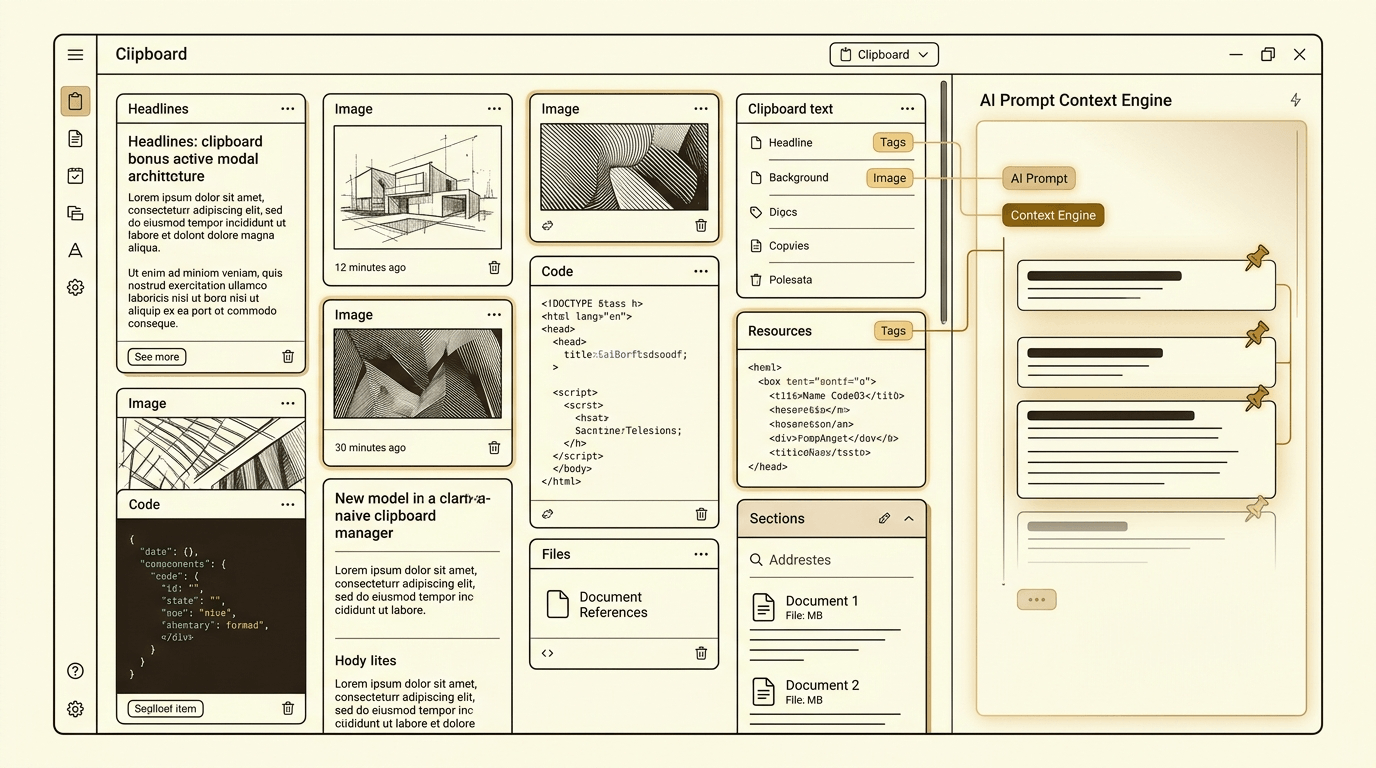
MonoClip: AI-native clipboard manager with mclip CLI, MCP server, and cross-platform support (macOS/Windows/Linux with Wayland).
Most clipboard managers are either platform-locked utilities or heavy Electron apps. MonoClip is different: it's an AI-native clipboard manager built with Tauri 2 (README states roughly 8 MB binary, 30 MB RAM, sub-200ms startup compared to typical Electron apps), with a mclip CLI that generates markdown context for any AI and a mclip mcp MCP server for Claude Desktop, Cursor, and Windsurf.
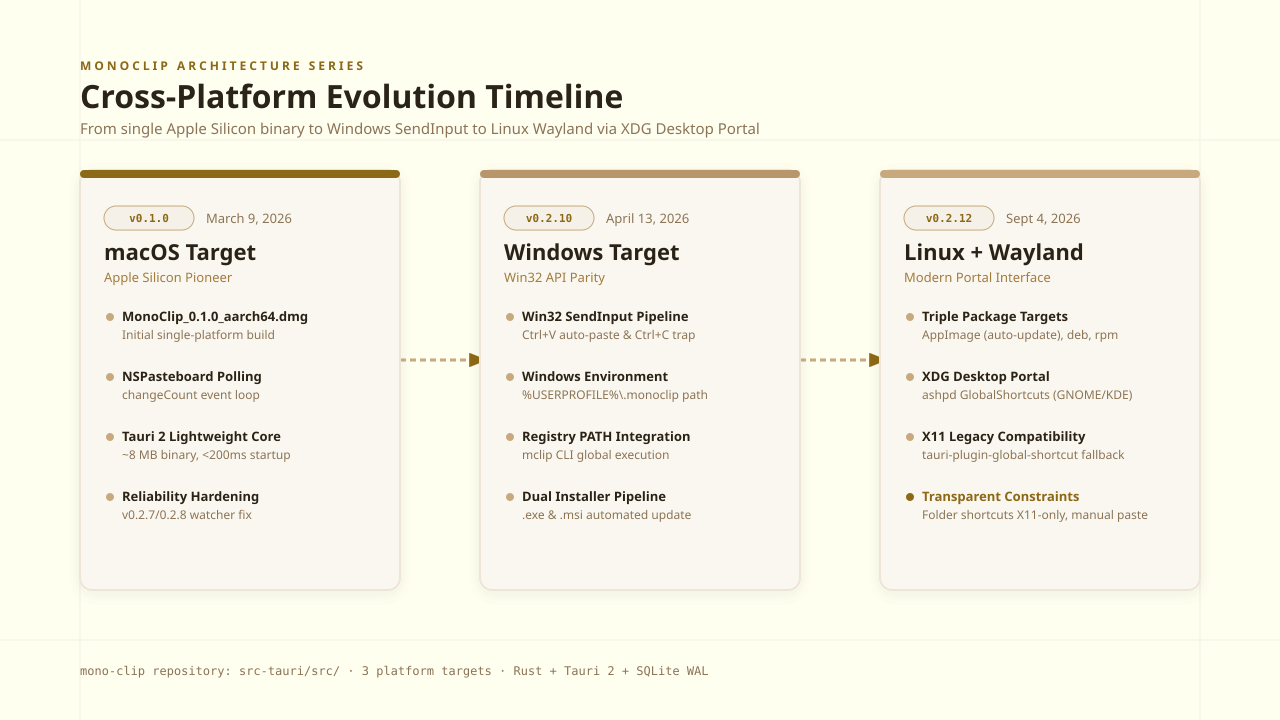
Starting as a macOS-only app (v0.1.0), MonoClip evolved to full cross-platform support: Windows (v0.2.10), Linux (v0.2.12) with Wayland support via XDG Desktop Portal. This post walks through the product's evolution: v0.2.0's AI integration (mclip context + mclip mcp with 8 tools), cross-platform journey, v0.2.9's fully automatic updates, and v0.2.12's monomind crash reporting integration.
1. AI-Native from Day One: mclip context and mclip mcp (v0.2.0)
CLI for markdown context blocks, MCP server with 8 tools for Claude Desktop/Cursor/Windsurf
v0.2.0 introduced mclip CLI bundled with the app, installing to ~/.local/bin with commands for list, add, remove, pin, unpin, and folder operations (commit 6c734f0 'feat: add mclip CLI bundled with the app'). The same release added AI integration via commit 4e9b2ed 'feat: add mclip context and mclip mcp for AI integration': mclip context generates a markdown context block for any AI (not just MCP-compatible ones), and mclip mcp runs a JSON-RPC stdio MCP server with 8 tools.
The 8 MCP tools (documented in README:262-292, verified in src-tauri/src/bin/mclip.rs:433-675) are: list_clips, add_clip, get_clip, remove_clip, pin_clip (boolean parameter covers pin/unpin), list_folders, create_folder, delete_folder. This makes MonoClip among the first Monoes products with native MCP support. Integration is documented with setup instructions for Claude Desktop, Cursor, and Windsurf—each editor's MCP config points to mclip mcp as a stdio server.
The CLI implementation is at src-tauri/src/bin/mclip.rs (currently 831 lines). Beyond text, v0.2.0 also added image and file clipboard support via commit 83ea5f6 'feat: add image and file/folder clipboard support + reliability fixes', documented in README:51-52: 'Copy an image—see the thumbnail. Copy a file or folder in Finder—get the full path.'
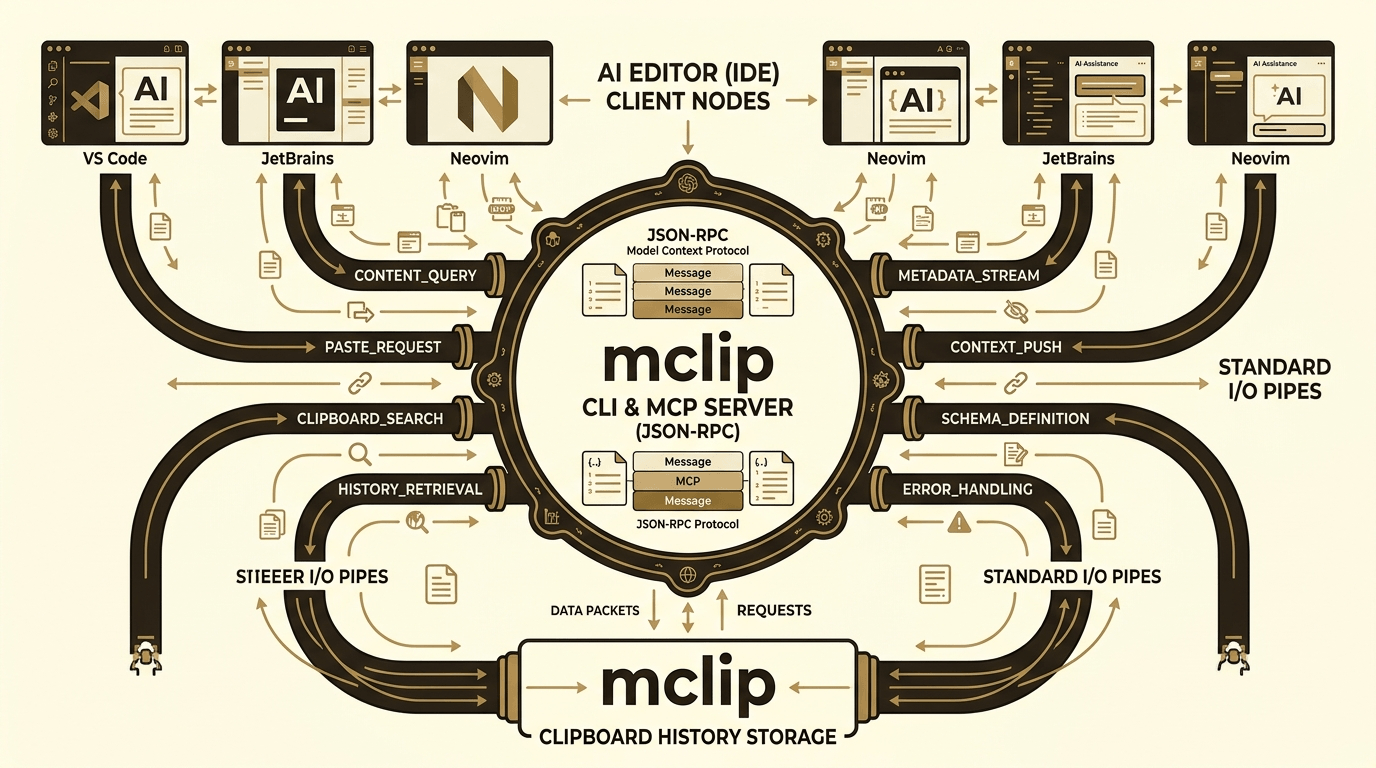
# Generate markdown context block for any AI (not MCP-specific)
mclip context

# Run MCP server (stdio JSON-RPC) for Claude Desktop/Cursor/Windsurf
mclip mcp

# CLI commands: list, add, remove, pin, folders
mclip list --limit 10
mclip add "text to save"
mclip pin <clip-id>
mclip folder create "AI Prompts"
Key Takeaways
- ✓v0.2.0: mclip CLI + mclip context (markdown for any AI) + mclip mcp (MCP server) (source: commits 6c734f0, 4e9b2ed)
- ✓8 MCP tools: list_clips, add_clip, get_clip, remove_clip, pin_clip (boolean covers pin/unpin), list_folders, create_folder, delete_folder (README:262-292, mclip.rs:433-675)
- ✓Among the first Monoes products with native MCP support—integrates with Claude Desktop, Cursor, Windsurf
- ✓Image and file clipboard support: thumbnails for images, full paths for files/folders (commit 83ea5f6, README:51-52)
2. Cross-Platform Evolution: macOS → Windows → Linux with Wayland
Windows support (v0.2.10), Linux with Wayland via XDG Desktop Portal (v0.2.12)
MonoClip started macOS-only: v0.1.0 shipped only for Apple Silicon (aarch64.dmg per gh release asset list). v0.2.10 added Windows support via commit 9a239fc 'feat: add Windows release target and cross-platform build support', with full implementation in commit 90e58be: HOME → USERPROFILE fallback for DB/images/crash reports, Win32 SendInput for Ctrl+V auto-paste and Ctrl+C selection capture, mclip installs to %USERPROFILE%\.monoclip\bin + user PATH via registry, platform-aware UI (Ctrl vs Cmd shortcuts), and updater picking .exe/.msi assets.
v0.2.12 brought Linux support via commit a5f3824 'feat: add Linux release support (AppImage, deb, rpm)' with all three bundle formats for x86_64 (AppImage self-updates; deb/rpm point to release page). The same release added Wayland global shortcuts via commit cd52078 'fix: make master shortcut changes take effect live, add Wayland support': XDG Desktop Portal GlobalShortcuts interface via ashpd library (src-tauri/src/shortcuts/portal.rs:18, Cargo.toml shows ashpd 0.13), requiring compositor backend support (GNOME 48+, KDE Plasma 6.4+ documented in README:136-137; COSMIC not yet supported). X11 path unchanged via tauri-plugin-global-shortcut. Known limitation: folder shortcuts still X11-only (README:136-137).
Cross-platform clipboard specifics: macOS uses NSPasteboard changeCount polling (reliability fixed in v0.2.7/v0.2.8 via commits 7ffa94f, 52e25d4); Windows uses Win32 SendInput for auto-paste and Ctrl+C for selection capture; Linux X11 works fully, Wayland master shortcut via XDG portal (folder shortcuts X11-only), no auto-paste (user must Ctrl+V manually). Linux system deps documented at README:153-159.
“Wayland support via XDG Desktop Portal GlobalShortcuts (ashpd)—requires GNOME 48+, KDE Plasma 6.4+; COSMIC not yet supported. Folder shortcuts still X11-only. We're being explicit about the gaps.”
- README:136-137
Key Takeaways
- ✓v0.1.0: macOS-only (Apple Silicon aarch64.dmg) (source: gh release asset list)
- ✓v0.2.10: Windows support (commit 9a239fc)—USERPROFILE fallback, Win32 SendInput, registry PATH, .exe/.msi updater
- ✓v0.2.12: Linux (AppImage/deb/rpm for x86_64, commit a5f3824) + Wayland (XDG Portal GlobalShortcuts via ashpd, commit cd52078)
- ✓Wayland limitation: GNOME 48+, KDE Plasma 6.4+ required; folder shortcuts X11-only; COSMIC not supported (README:136-137)
3. Fully Automatic Updates and Cross-Product Integration
Zero-touch updates (v0.2.9), monomind crash reporting (v0.2.12), and critical reliability fixes
v0.2.9 introduced fully automatic updates via commit 061359a 'feat: fully automatic update—download, install, relaunch without user intervention'. The updater supports both Homebrew and direct-install paths, downloads the DMG, mounts it, copies to /Applications, unmounts, and relaunches—showing progress toasts to the user but requiring no manual steps.
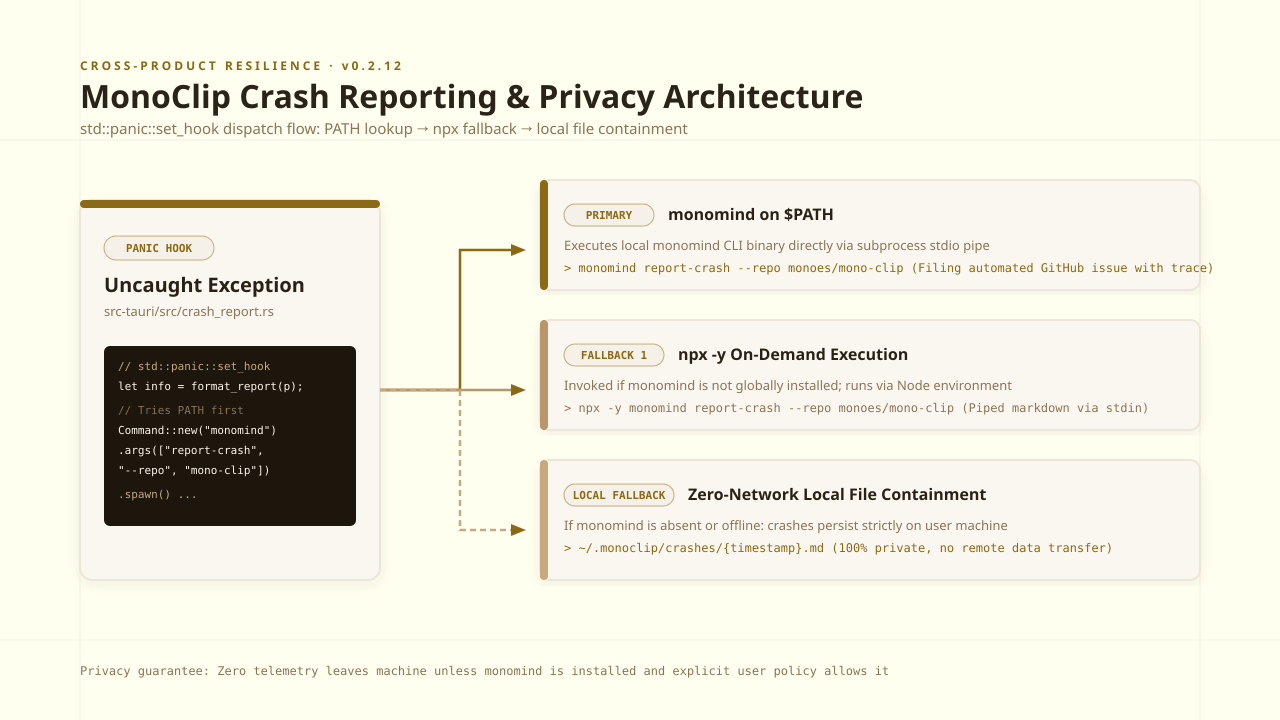
v0.2.12 added monomind integration for crash reporting via commit f27dc43 'feat: auto-report uncaught panics as GitHub issues'. The panic hook implementation at src-tauri/src/crash_report.rs (110 lines, registered from lib.rs) attempts to shell out to monomind report-crash --repo monoes/mono-clip --title <title> --body <body>, trying monomind on PATH first with a 20-second timeout, then falling back to npx -y monomind report-crash, and finally saving crashes to ~/.monoclip/crashes/{timestamp}.md locally if monomind isn't installed—no data leaves the machine without monomind present. The real implementation uses std::env::var_os("HOME").or_else(|| USERPROFILE) for cross-platform path handling, not literal tilde expansion.
Earlier reliability fixes were critical for clipboard capture: v0.2.7 rewrote NSPasteboard changeCount handling via commit 7ffa94f 'fix: reliable clipboard capture using NSPasteboard changeCount', and v0.2.8 prevented watcher thread death via commit 52e25d4 'fix: prevent watcher thread death causing permanent clipboard capture loss'. v0.2.13 (current version) fixed a critical mclip executable issue: commit 3c70ca1 'fix: mclip shipped non-executable in every release bundle'—the bundled mclip binary was 644 (not executable) in all prior Unix releases because the build step creates a 644 placeholder, then cp preserves destination mode. Fixed with explicit chmod +x after copy, affecting all platforms (macOS, Linux)—v0.2.12 and earlier had broken mclip.
Key Takeaways
- ✓v0.2.9: Fully automatic updates—download, install, relaunch without user intervention (commit 061359a)
- ✓v0.2.12: monomind crash reporting integration (commit f27dc43, src-tauri/src/crash_report.rs 110 lines)—monomind on PATH → npx fallback → local file if absent
- ✓Critical reliability fixes: v0.2.7 NSPasteboard changeCount (commit 7ffa94f), v0.2.8 watcher thread death prevention (commit 52e25d4)
- ✓v0.2.13: Fixed mclip non-executable in all prior Unix releases (commit 3c70ca1)—v0.2.12 and earlier had broken mclip
Conclusion & Future Outlook
MonoClip isn't a future roadmap or a platform-locked niche tool—it's a shipping, cross-platform, AI-native clipboard manager with 15 tagged releases. The evolution is real: macOS-only (v0.1.0) → Windows support (v0.2.10) → Linux with Wayland (v0.2.12), with AI integration (mclip CLI + MCP server with 8 tools) shipping in v0.2.0 and monomind crash reporting integration in v0.2.12.
The honest gaps: Wayland support requires GNOME 48+ or KDE Plasma 6.4+ (COSMIC not yet supported), folder shortcuts are still X11-only on Linux, and Linux has no auto-paste (user must Ctrl+V manually). v0.2.13 fixed a critical bug where mclip shipped non-executable in all prior Unix releases—so v0.2.12 and earlier had broken CLI on macOS/Linux.
MonoClip is built with Tauri 2: README states roughly 8 MB binary vs typical 150 MB Electron, 30 MB RAM vs 300 MB, sub-200ms startup vs typical 2s. Tech stack: Svelte 5 (runes) + Vite + Tailwind CSS 3 frontend, Rust backend, SQLite (rusqlite, WAL mode), tauri-plugin-clipboard-manager, tauri-plugin-global-shortcut, tauri-plugin-autostart (README:295-322). Repository at github.com/monoes/mono-clip.
Deploy Monomind Digital Workers Today
Run open-source AI agent teams on your own infrastructure or hire Monoes Workforce to build and audit fully managed operations.
0 comments
No comments yet.